
My Cart



Card Printers
PVC Card Printers for Professional ID Cards and Badges
PVC card printers allow businesses and organisations to create ID cards, employee badges, membership cards and other personalised plastic cards. Discover professional card printers for different print volumes and requirements, with a range of printing technologies, resolutions and connectivity options.
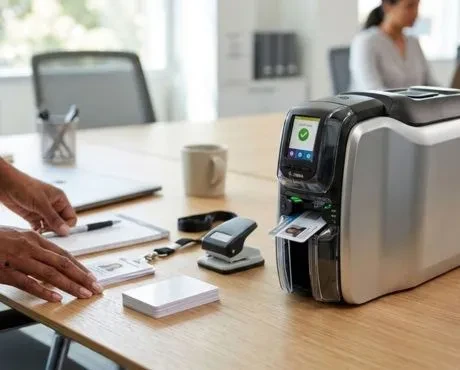
Key Features and Functions of Card Printers
Choosing the right card printer depends on the type of card you need to produce, your print volume and the level of personalisation required. Before selecting a model, compare the printing technology and resolution, single-sided or dual-sided printing, connectivity options and compatible consumables.
| Single-sided printing | Ideal for cards and ID badges that only require information to be printed on the front. |
| Dual-sided printing | Allows you to print on both sides of the card to include additional information, instructions, codes or other details. |
| Colour or monochrome printing | Choose the right printing option for your needs: colour printing for photos, logos and graphics, or monochrome printing for simple information in a single colour. |
| Print resolution | Determines the level of detail and clarity of photos, text, logos and other elements printed on the card. |
| Connectivity | USB, Ethernet or other connectivity options are available depending on the model and the integration required for your workplace. |
| Consumables | Check that the PVC cards and printer ribbons are compatible with your chosen card printer. |
How to Choose the Right PVC Card Printer
- OK Define your application: ID cards, employee badges, membership cards or other professional cards.
- OK Consider the print volume: check the printer's speed and capacity based on the number of cards you need to produce.
- OK Choose single- or dual-sided printing: decide whether you only need to print on the front of the card or also include information on the back.
- OK Check the print resolution: good resolution is particularly important for photos, logos, small text and detailed graphics.
- OK Check the connectivity: make sure the card printer can be properly integrated with your existing equipment and applications.
- OK Check the consumables: confirm which cards and printer ribbons are compatible before purchasing.
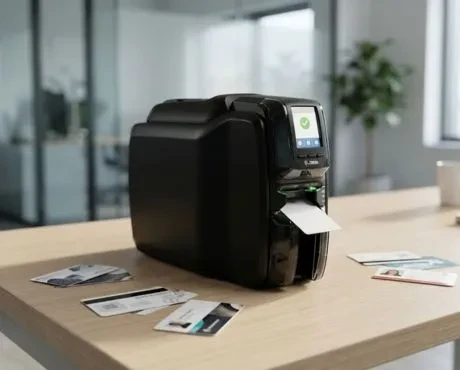
What Is a PVC Card Printer Used For?
A PVC card printer allows you to personalise plastic cards with text, photos, logos, barcodes and other identification elements. It can be used for PVC card printing for employees, visitors, members or event attendees, as well as for creating ID badges and other personalised cards for professional use.
ID Card and Badge Printers for Businesses
A professional badge printer is particularly useful when you regularly need to create identification cards within your organisation. ID card printers can be used to produce cards for employees, visitors, events, educational establishments and other environments where identifying people is necessary.
What Consumables Are Required?
Card printers use specific consumables depending on the model and printing technology. It is important to check both the card format and the reference of compatible printer ribbons. An unsuitable ribbon may not work with your printer, even if it looks similar to another consumable. Always check the manufacturer's specifications before choosing your cards and printer ribbons.
Using Card Printers in Professional Environments
Card printers are used in businesses, educational establishments, organisations, events and other professional environments. They can produce employee and visitor ID cards, membership cards, badges and other personalised cards. Having your own card printer also makes it easier to produce new cards when a new employee or user arrives or when an existing badge needs to be replaced.
Why Choose Onedirect?
Onedirect offers professional card printers for a range of identification and personalisation requirements. Compare models by printing type, print resolution, connectivity and print volume. Our experts can also help you check compatibility between your chosen card printer and the required consumables.
FAQ – Frequently Asked Questions
What is a PVC card printer?
A PVC card printer is designed to personalise plastic cards with text, photos, logos, codes and other elements. It is commonly used to create ID badges, identification cards and other professional cards.
What can you print with a card printer?
Depending on the model, you can print photos, names, logos, text, barcodes and other elements used to identify or personalise a card.
What is the difference between a single-sided and dual-sided card printer?
A single-sided card printer only prints on the front of the card. A dual-sided card printer can also personalise the back, making it useful when you need to include additional information.
Are all PVC cards compatible with all card printers?
No. You need to check the card dimensions, thickness and type supported by the printer. Always check the manufacturer's specifications before choosing your cards and other consumables.
How do I choose the right ID card printer?
Consider the number of cards you need to print, whether you require single-sided or dual-sided printing, the print resolution, connectivity options and the type of compatible consumables.
Are card printer ribbons universal?
No. Each card printer uses specific printer ribbons and consumables. Always check that they are compatible with the brand and model of your card printer before purchasing.