
My Cart



Stylus Pen
Precise input for interactive displays
Stylus pens are the ideal complement for interactive displays and digital whiteboards. They enable precise writing, drawing and annotation – a major advantage in meetings, training sessions and workshops where content needs to be developed quickly and presented clearly. With a digital pen, you exploit the full potential of your interactive solutions, increase precision when annotating and make collaboration intuitive and natural.

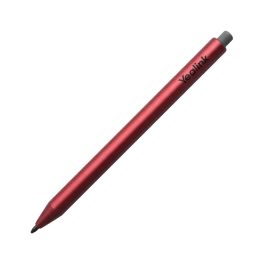
Yealink MB-Stylus-4A (4 pieces)
IN STOCKProfessional styluses for Yealink MeetingBoard interactive screens: fluidity, precision and comfort at your fingertips.- Compatibility: Yealink MeetingBoard screens
- Smooth and precise writing, with no latency
- Ergonomic design for extended use
- Automatic pen vs finger detection
- Ideal for meetings, brainstorming sessions and collaborative sessions
£43.99 £52.79 Incl. VATRef: YEAMBSTYLUS4ACompare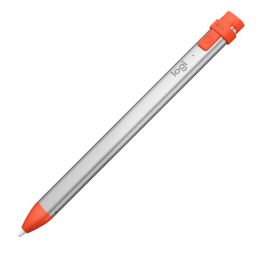
Logitech Crayon Stylus Pen
Call us for availabilityUnleash your creativity with precision and ease.- Wide compatibility with Apple tablets.
- Lightweight design at only 20 g, easy to use and carry.
- Powerful lithium battery with up to 7.5 hours of use.
- Fast, hassle-free Bluetooth connection.
- Stylish orange and white colour, with a modern design.
£64.99 £77.99 Incl. VATRef: LODIGIPENCompare
Characteristics and Core Functions
Professional stylus pens are designed to be comfortable for extended use while delivering controlled, predictable input on touch surfaces in business and education environments.
| Soft or fine precision tips | Protect the screen surface and enable accurate highlighting or handwriting. |
| Compatibility with capacitive touch technology | Works with a wide range of tablets and interactive displays without additional setup. |
| Ergonomic design | Comfortable grip supports long meetings, lessons or design sessions. |
| Durable construction | Withstands frequent handling in classrooms, meeting rooms and shared spaces. |
| Pressure sensitivity (where supported) | Allows variable line thickness for drawing, diagramming and creative work. |
How to Select the Right Stylus Pen
- OK Device compatibility – Confirm whether the display requires a specific active pen or supports generic capacitive styluses.
- OK Use case – Choose robust pens for shared classroom or meeting room use, or finer, pressure-sensitive models for design and creative tasks.
- OK Comfort and ergonomics – Consider barrel thickness, weight and grip texture for frequent users.
- OK Storage and loss prevention – Look for magnetic attachment, tethers or pen trays in shared environments.
- OK Replacement availability – Ensure spare tips and additional pens can be sourced easily.
Applications Across Professional Environments
Teachers and students use stylus pens on interactive displays to solve exercises, annotate diagrams and capture ideas directly on the board. Reliable, comfortable pens encourage participation and smooth lesson flow.
In meeting rooms, presenters rely on stylus pens to highlight key points on slides, annotate documents and record action items during collaborative sessions.
Designers, engineers and technical teams use compatible active pens to sketch concepts, mark up drawings and work within creative or CAD software, benefiting from fine control and pressure sensitivity.
Why Partner with Onedirect?
Onedirect offers stylus pens compatible with a wide range of professional touch displays and tablets. Our selection focuses on quality, durability and smooth interaction to support intensive professional use.
We help organisations identify the right pen types for their devices and usage scenarios, from shared classroom tools to precision pens for specialist applications.
With fast delivery, permanent stock availability and knowledgeable support, Onedirect ensures that interactive environments remain fully equipped and ready for daily use.
FAQ – Frequently Asked Questions
What is the difference between a passive stylus and an active stylus?
Passive styluses work with standard capacitive touch screens, while active styluses communicate with the display to enable features such as pressure sensitivity and palm rejection.
Are stylus pens compatible with all touch displays?
Not always. Some interactive displays require specific active pens, so compatibility should be checked before purchase.
Are stylus pens suitable for shared environments?
Yes. Many professional styluses are designed for durability and frequent handling in classrooms and meeting rooms.
Can stylus tips damage interactive screens?
Professional stylus pens use soft or specially designed tips that protect screen surfaces when used correctly.
Can stylus pens be replaced or repaired?
Many models offer replaceable tips or are available individually, making it easier to maintain shared interactive setups.