
My Cart



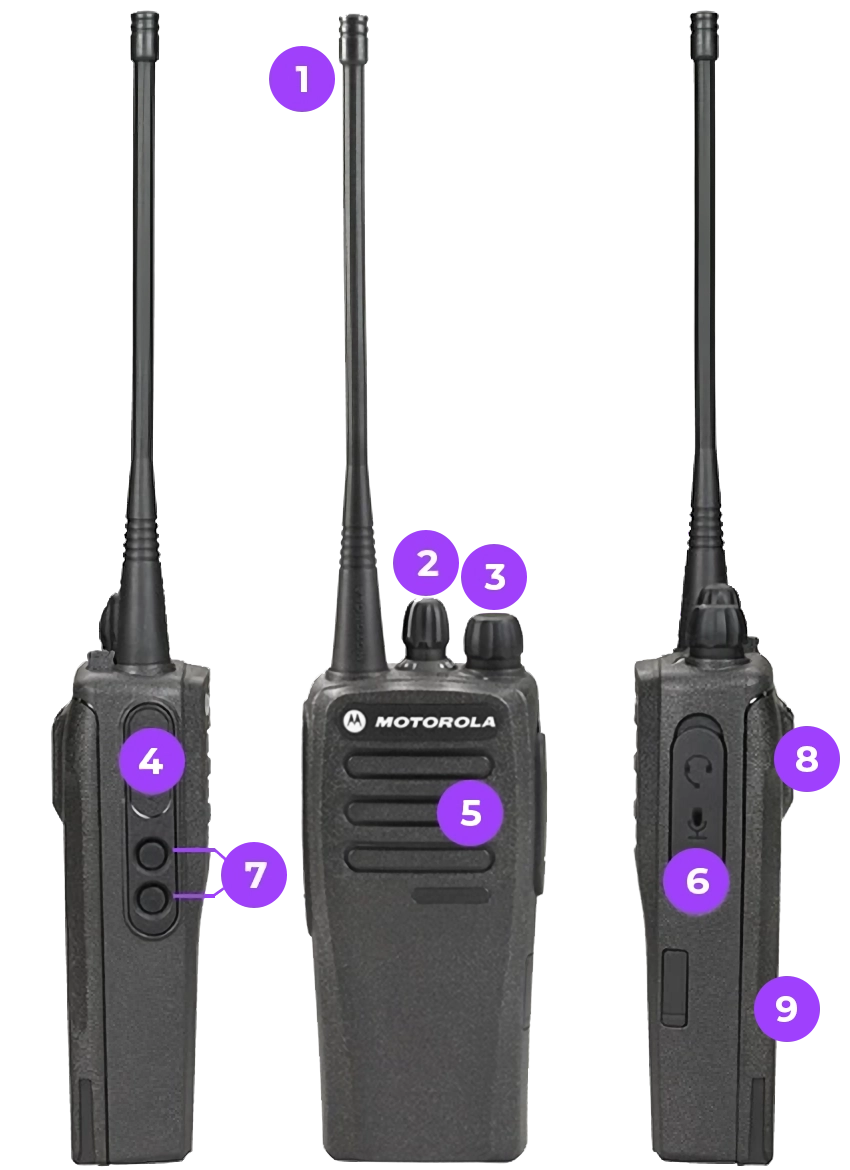
Discover the Essential Components of a Walkie-Talkie
If you’ve found yourself on this page, you’re probably holding a walkie-talkie and wondering what all those buttons and accessories do. Don’t worry—we’re here to guide you through it all!
Not sure what you need?
1
Antenna
This little rod is key to ensuring your messages travel through the air to your recipient.
"The length of the antenna directly impacts range. A small antenna is perfect for short-distance communications, while a longer one helps improve the signal in environments with obstacles."
2
Channel Selector
This knob lets you switch between channels, much like changing frequencies on a radio. Each channel corresponds to a different frequency, allowing you to communicate without interference.
3
Power/Volume Button
Typically found on the side or top, this button powers your device on and controls the volume. Turn it to switch on, and twist it the other way to turn off. Simple, right?
4
PTT (Push-to-Talk) Button
Whenever you want to speak, press this button. It’s like a switch that says, "It’s my turn to talk!" Release it once you're done to allow others to respond.
"This system keeps conversations organised by preventing multiple people from speaking at the same time."
5
Microphone and Speaker
In the same area, you’ll find the spot where you talk and listen, usually marked by a small grille. Tip: Don’t hold it too close to your mouth, this helps avoid sounding like you’re shouting!
6
Accessory Connector
On some models, you’ll find a socket for connecting headphones. Perfect for added discretion or for communication in noisy environments.
7
Programmable Buttons
These are shortcuts: you can configure them to perform specific actions. Want to change the channel or activate a special function? You decide their purpose!
8
Belt Clip
This little clip on the back isn’t just for decoration! It lets you attach your walkie to your belt for easy carrying.
"These belt clips are designed to withstand sudden movements and keep the device secure, even during intense activities."
9
Battery
Usually located at the back of the walkie, it’s accessible via a small cover. A handy tip: don’t forget to charge it before heading out on your next adventure!
Find the perfect walkie-talkie for you in just a few clicks
Not sure what you need? Answer these few questions, and one of our sales representatives will help you bring your project to life!
Form