My Cart



Touchscreen Displays

Newline C Series 86” 4K Touch Display
DiscontinuedProfessional 86-inch interactive display with 4K UHD resolution, Stellar Touch technology and USB-C connectivity, designed for education and collaboration with PCs or OPS.- 86" interactive display for large classrooms and meeting rooms
- 4K UHD resolution for crisp, detailed content
- Stellar Touch technology with up to 40 simultaneous touch points
- No operating system, ideal for use with external PC or OPS
- Plug & Play USB-C connectivity for audio, video, data and touch
- Integrated front speakers 15 W x2
Check the alternative productRef: NEWLTT8623CCompare
Iiyama ProLite TE7514MIS-B2AG
Discontinued75" 4K interactive display with ultra-precise touchscreen technology and iiWare 12E – perfect for meetings and education.- Touchscreen designed for education and business use
- 75" display with 4K UHD resolution
- PureTouch-IR touch technology: millimetre-level precision
- 4 built-in speakers and 8 integrated microphones
- iiWare 12E: built-in web browser, cloud access, and WPS Office
- Continuous 24/7 operation
- Supports AirPlay, Chromecast, and Miracast
Check the alternative productRef: IITE7514MISB2AGCompare
Newline 75'' C Series Plug and Play Touch Display
DiscontinuedTransform your collaboration with stunning 4K clarity.- No On-board OS - Connect your preferred devices without complexity.
- Ultra Bright Display - Enjoy vibrant visuals even in well-lit environments.
- 4K UHD Resolution - Experience exceptional clarity and detail during meetings.
- Up to 40 Points of Touch - Facilitate collaboration by supporting multiple users simultaneously.
- Plug & Play Design - Set up quickly to maximise productivity in any environment.
Check similar productsRef: NEWTT7523CUKCompare
Characteristics and Core Functions
Professional Touch Screens combine robust hardware with collaboration-focused software features and support both local and remote contributors in corporate and educational environments. They replace traditional projector-and-whiteboard setups with an integrated, low-maintenance solution designed for daily use in meeting and training areas and built for 16/7 operation.
| High-precision PCAP or infrared touch | Reliable recognition of writing and gestures enables natural interaction with minimal lag |
| 20–40 point multitouch | Multiple users can work at the screen simultaneously, supporting group tasks and workshops |
| 4K UHD resolution | Fine detail improves legibility for complex diagrams, spreadsheets and multimedia content |
| Anti-glare panel and 350–500 nit brightness | Optimised for indoor rooms with mixed lighting, reducing reflections and eye fatigue |
| Android / Windows compatibility | Supports a broad range of applications, from office suites to specialised training tools |
| Integrated collaborative software and whiteboard mode | Enables instant brainstorming and annotation sessions without additional licences |
| HDMI / USB-C / LAN / WiFi connectivity | Flexible connection options for laptops, room PCs and networks, including wireless mirroring |
| Built-in speakers and mounting options | Streamlined installations with audio included and the choice of wall mounts or mobile stands |
| Wireless mirroring | Easy content sharing from devices without switching cables |
How to Select the Right Touch Screen
- OK Usage scenarios – Determine whether the focus is on classroom teaching, corporate workshops, training centres or mixed-use rooms
- OK Screen size and viewing distance – Match diagonal size to room dimensions so that content remains clear from every seat
- OK Software ecosystem – Consider which collaboration platforms, whiteboard tools and learning applications you need to support
- OK Connectivity preferences – Decide whether USB-C, LAN-based management or extensive wireless sharing is a priority
- OK Mobility requirements – Choose between fixed wall-mounted displays and mobile carts for rooms that serve multiple functions
- OK Operational intensity – Check duty-cycle ratings where screens will be used for long days or back-to-back sessions
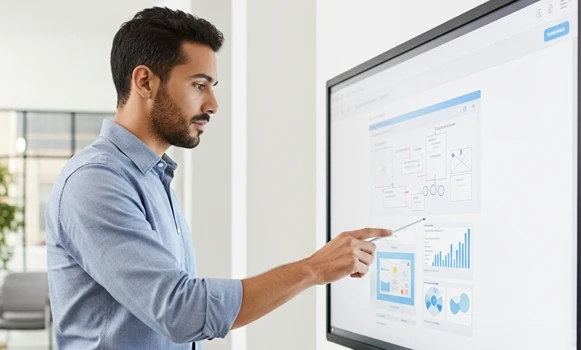
Applications Across Professional Environments
In corporate meeting rooms, Touch Screens provide a shared workspace for outlining project plans, revising documents and annotating presentations in real time. Remote participants can follow changes instantly, improving engagement and decision-making.
Training departments and learning centres use interactive displays to deliver structured courses, simulations and hands-on exercises. Trainees can interact directly with content, making complex topics easier to understand and retain.
Reception areas, visitor hubs and information points benefit from touch-based navigation, allowing guests to explore maps, service information or booking options without requiring staff intervention.
Why Partner with Onedirect?
Onedirect offers Professional Touch Screens from leading manufacturers such as iiyama, Samsung, Newline, Maxhub and LG, selected for professional reliability and image performance. Our permanent stock availability and efficient logistics enable delivery of multi-room or multi-site projects within tight timelines.
Our specialists help you define screen sizes, mounting strategies and connectivity options aligned with your collaboration tools, teaching methods and room usage. We also consider future expansion, ensuring additional spaces can be equipped with matching technology.
With ongoing after-sales support, Onedirect remains your point of contact for accessories, warranty management and upgrades throughout the lifecycle of your interactive displays.
FAQ – Frequently Asked Questions
What is the difference between a professional touch screen and a standard display?
Professional touch screens support multi-touch input, annotation and collaboration software, allowing users to interact directly with content rather than only viewing it.
Are professional touch screens suitable for education and training?
Yes. Their durability, touch accuracy and collaborative features make them ideal for classrooms, training centres and learning environments.
Can multiple users interact with the screen at the same time?
Most professional touch screens support 20–40 simultaneous touch points, enabling group work and collaborative workshops.
Do professional touch screens work with laptops and room PCs?
Yes. They support standard connections such as HDMI and USB-C, as well as wireless mirroring for easy content sharing.
Are professional touch screens designed for daily use?
Yes. With 16/7 operational ratings and commercial-grade components, they are built to handle frequent daily use.