
My Cart



TOP 10 BEST TELEPHONE HEADSETS – 2026
For office calls, meetings on the go, workout sessions, and even gaming, a headset is the essential audio accessory! Wired or wireless, mono or stereo, over-ear or in-ear, with active noise cancellation... These are just a few criteria that you need to carefully consider to find the product that’s right for you.
Feeling lost? Take a look at our ranking of the top 10 professional telephone headsets! We review 10 must-have models on the market to help you get a clearer picture. Have questions? We answer them at the bottom of the page in our dedicated section!
IconTOP 10 Icon Comparison table IconFAQ

Our winning trio
Number 1
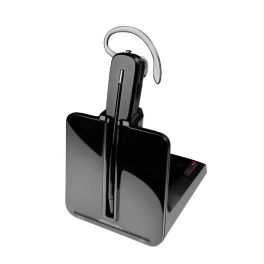
Convertible design with multiple wearing styles
Ultra-lightweight at just 21 g
DECT range of up to 120 metres
Noise-cancelling microphone and SoundGuard acoustic protection
Number 2
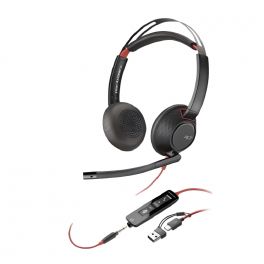
Poly Blackwire 5220 Stereo USB-C + 3.5mm Plug + USB-C/A Adapter
4.5 of 2 Reviews
IN STOCK
Passive noise cancellation
Foldable for easy transport
Call control from the cable
Number 3
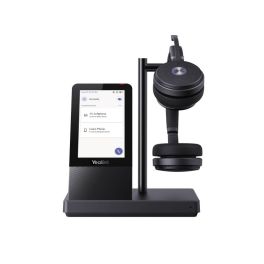
All-in-one station: integrated touchscreen, USB hub and speaker.
Great freedom: 14 hours of battery life, 160 m range.
Our complete ranking:
Best for call center agents
The HP Poly CS540A is an exceptionally lightweight mono DECT headset, designed for professionals who make a lot of calls on a landline. Its convertible design allows you to choose between several wearing styles to prioritise comfort and discretion. Weighing just 21 g, with a wireless range of up to 120 metres and a battery life of up to 7 hours, it offers true freedom of movement in the office. Its noise-cancelling microphone improves the clarity of conversations, whilst SoundGuard technology protects your hearing from sudden loud noises. By Sector
Manufacturing
Retail
Transportation & logistics
Hotels and restaurants
Public administrations
Education
Corporate and Office
Health and social action

Features
SoundGuard
DECT
120m
21g
Pros
Convertible design with multiple wearing styles
Ultra-lightweight at just 21 g
DECT range of up to 120 metres
Noise-cancelling microphone and SoundGuard acoustic protection
Cons
Battery life limited to 7 hours of talk time
Neckband and remote answer solutions available separately
Best versatile wired headset
The Blackwire 5220 wired model stands out today thanks to its versatile connectivity: you can choose between USB-A, USB-C and Jack! In other words, it connects to both your computers and your mobile devices. With its two faux leather ear cups and padded headband, it offers maximum everyday comfort! Whether you're at the office or at home, you can count on the noise-cancelling microphone and dynamic equaliser! Together, they reduce background noise and digitally optimise your voice during calls so that it is always transmitted clearly. By Sector
Manufacturing
Construction
Retail
Transportation & logistics
Hotels and restaurants
Public administrations
Education
Corporate and Office
Health and social action
Call center

Features
SoundGuard Digital
Corded
Inline volume control
165,2 g
Pros
Passive noise cancellation
Foldable for easy transport
Call control from the cable
Cons
It is wired
Best Teams headset with smart base
The Yealink WH66 Duo Teams is not just a headset: it's a true smart workstation. With its colour touchscreen and integrated USB hub, it centralises all your devices and makes it easy to control your calls! Thanks to Yealink's noise-cancelling technology, your conversations remain crystal clear, even in the noisiest offices. And with 14 hours of battery life and a 160-metre range, you're free to move around all day long. A headset designed for connected professionals... with high standards. Translated with DeepL.com (free version) By Sector
Hotels and restaurants
Public administrations
Education
Features
Bluetooth, DECT
160m
127g
Pros
All-in-one station: integrated touchscreen, USB hub and speaker.
Great freedom: 14 hours of battery life, 160 m range.
Cons
Smartphone charger sold separately.
Best comfort for long workdays
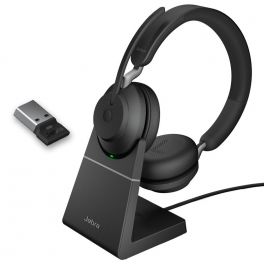
Jabra Evolve2 65 USB-A MS Duo is a wireless headset for PC and smartphone with dual Bluetooth connection dongle USB-A. The Jabra Evolve2 headphones are specially designed for all working environments and users. Evolve2 65 is a professional, high-quality headphone for intensive use. It is particularly suitable for use when the user needs to isolate himself from his environment to focus on his conversation and reduce ambient noise. By Sector
Manufacturing
Construction
Retail
Transportation & logistics
Hotels and restaurants
Public administrations
Education
Corporate and Office
Health and social action
Call center

Features
Jabra SafeTone
Bluetooth
30m
On headset volume control
176,4g
Pros
Superior call performance
Optimized for Microsoft Teams with dedicated button
Up to 37h of autonomy and fast charging option in 15 min.
Desk charger included
Cons
Weight: 176 grams
Only charge on the dock station
Best for reception and front desk
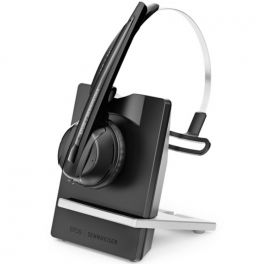
Wireless headset for office phones. The Sennheiser brand is known for the sound quality of its microphones and headsets. The EPOS IMPACT D10 Phone features an entirely new, more modern, and streamlined design that allows it to easily integrate into a professional environment. This is a wireless headset for desk phones with three different wearing styles. High-definition audio and the Sennheiser noise-canceling microphone perfectly reduce ambient noise: your conversation partner hears only your voice. These headsets provide wideband sound that optimizes voice quality for a very natural conversation. Additionally, the headset protects you from acoustic shocks thanks to its ActiveGard technology, which complies with noise regulations in the workplace by automatically limiting noise to 85dB. By Sector
Hotels and restaurants
Public administrations
Education

Features
ActiveGard
DECT
55 - 180 metres
On headset volume control
55g
Pros
Wireless with long range
Very good sound quality
Great headset brand
Cons
Compatible only with desk phones
Best price-performance
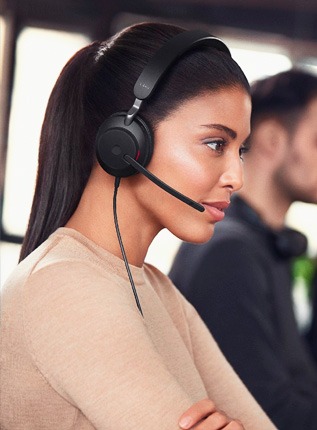
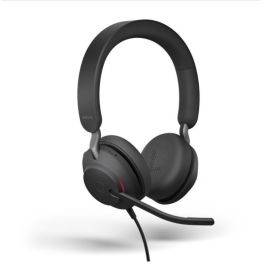
The Jabra Evolve2 40 SE is a wired stereo headset designed for professionals seeking focus and call clarity. With its passive noise-isolating ear cushions, 40 mm drivers and 3-microphone system, it effectively reduces distractions whilst delivering rich, natural sound. Certified for Microsoft Teams, it also features a visible Busylight indicator to minimise interruptions in the office. Lightweight and comfortable, it is ideal for long working days in open-plan offices or when working from home. By Sector
Manufacturing
Retail
Transportation & logistics
Hotels and restaurants
Public administrations
Education
Corporate and Office
Health and social action
Call center
Features
Jabra SafeTone 2.0TM
Corded
On headset volume control
188g
Pros
Excellent passive noise isolation against ambient noise
3-sensor microphone for clearer calls
USB-C / A connector for greater flexibility
Cons
Wired headphones that restrict freedom of movement
No active noise cancellation (ANC)
Best DECT headset for non-stop calls
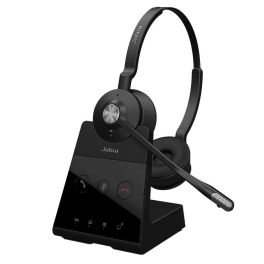
Discover the Jabra Engage 65 SE Duo: the ultimate companion for your professional communications! With this DECT headset, you get all the freedom of movement you desire on your landline (up to 150m range)! Thanks to its 2 noise-cancelling microphones, ambient sounds are eliminated, even in the noisiest environments. The enhanced speakers and smart volume control ensure unmatched call clarity at all times.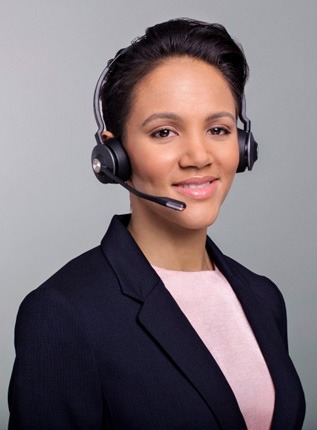
Features
-
Pros
Better acoustic isolation: synthetic leather earcups
Rechargeable battery in 90 minutes
Extended range: up to 150m wireless
Cons
No Bluetooth connection
Best for professionals in open spaces
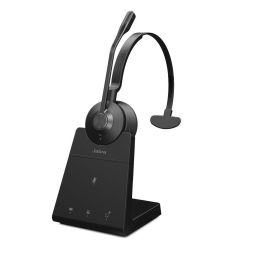
The Jabra Engage 45 SE Mono is a lightweight DECT headset with up to 150m range, noise-cancelling mics, and 13 hours of talk time. Perfect for clear, comfortable calls in busy office environments.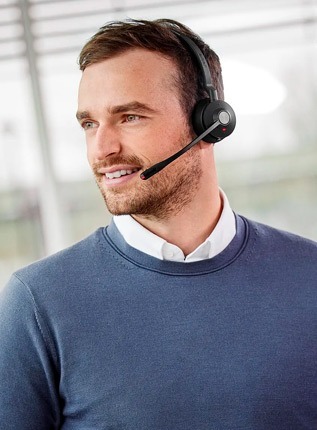
Features
PeakStop + SafeTone 2.0
DECT
150m
On headset volume control
57g
Pros
Lightweight and comfortable for all-day use (only 57g)
Up to 150m wireless range with DECT technology
Clear audio with dual noise-cancelling microphones
Cons
Mono design may not suit users who prefer full stereo sound
Busylight only active when not in use, limiting visibility
No Bluetooth connectivity for mobile device pairing
Best wireless headset for office productivity
The Poly Voyager 4320 USB-A Microsoft Teams Wireless Headset delivers crystal-clear audio with noise-canceling technology, dual connectivity, and all-day comfort. Its Teams certification and long battery life make it ideal for hybrid work setups. By Sector
Manufacturing
Construction
Retail
Transportation & logistics
Hotels and restaurants
Public administrations
Education
Corporate and Office
Health and social action
Call center

Features
SoundGuard Digital
Bluetooth
50m
On headset volume control
162g
Pros
Optimized for Teams with a dedicated Teams button.
Up to 24 hours of talk time on a single charge.
Lightweight with cushioned ear pads for long-term use.
Cons
Does not include active noise cancellation for full audio immersion.
May not feel as premium compared to higher-end models.
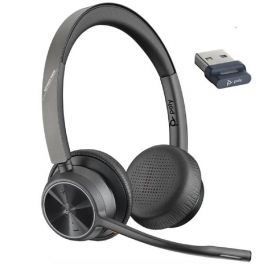
Best stereo sound for extended calls
The EPOS Impact SC660, designed for intensive use, is equipped with two synthetic leather earcups that provide excellent sound insulation, ensuring you stay focused on the ongoing conversation. The ultra-noise-canceling microphone clearly transmits your words while reducing background noise, so no distractions interfere with your voice. Bonus: ActiveGard technology protects your hearing from sound spikes that can occur during a call. By Sector
Manufacturing
Construction
Retail
Transportation & logistics
Hotels and restaurants
Public administrations
Education
Corporate and Office
Health and social action
Call center

Features
ActiveGard®
Corded
110g
Pros
High-quality audio
Robust: impressive durability
Ultra-effective noise-canceling microphone
Cons
QD: requires a cable for use

| 1 | 2 | 3 | 4 | 5 | 6 | 7 | 8 | 9 | 10 | |
| Acoustic protection | SoundGuard | SoundGuard Digital | Jabra SafeTone | ActiveGard | Jabra SafeTone 2.0TM | PeakStop + SafeTone 2.0 | SoundGuard Digital | ActiveGard® | ||
| Charger Type | With charging base | - | - | With charging base | With charging base | - | - | With charging base, With USB charger | With USB charger | - |
| Compatibility | For Desk phones | For Mobiles, For PC | For Mobiles, For PC | For Mobiles, For PC | For Desk phones | For Mobiles, For PC | - | For Desk phones | For Mobiles, For PC | For Desk phones |
| Tecnología | DECT | Corded | Bluetooth, DECT | Bluetooth | DECT | Corded | - | DECT | Bluetooth | Corded |
| Mono/duo | Mono headsets | Duo headsets | Duo headsets | Duo headsets | Mono headsets | Duo headsets | Mono headsets | Duo headsets | Duo headsets | |
| Range | 120m | 160m | 30m | 55 - 180 metres | 150m | 50m | ||||
| Standby time / Talk time | - / 7h | 14 hours | - Up to 37 hours | 100 heures / 12 heures | 13h | 50 jours / 24 heures | ||||
| Volume control | Inline volume control | On headset volume control | On headset volume control | On headset volume control | On headset volume control | On headset volume control | ||||
| Wearing style | Ear loop | Headband | Headband | Headband | Headband | Headband | Headband | Headband | Headband | |
| Weight | 21g | 165,2 g | 127g | 176,4g | 55g | 188g | 57g | 162g | 110g |
FREQUENTLY ASKED QUESTIONS
Telephone headset: how to make the right choice?
The perfect headset is not necessarily the most expensive model, or the one that just hit the market. It's the one that ticks all the boxes: work environment, connection preferences, wearing style... We've prepared a quick summary of the key features to consider when choosing your headset:
Wired or wireless: Do you need to move freely? If the answer is yes, we recommend going for a wireless headset! Otherwise, a wired model will do the job perfectly (and you’ll save some money too!).
Connection type: Depending on the device you use (phone, mobile/tablet), the connectivity of your headset will vary: RJ, QD, USB... And if you want to communicate across multiple devices, you can always opt for a multi-device headset, with dual or triple connection!
Mono or Duo: Do you work in a quiet environment? Do you like your colleagues? If so, a mono headset is the perfect solution for you! However, don’t rely on a mono model if you’re in an open office, or you can kiss your concentration goodbye! In noisy environments, opt for the sound isolation of a duo headset!
With noise-cancelling microphone: Going back to noisy work environments, if the duo headset isolates you from ambient noise, it doesn’t necessarily eliminate it during audio transmission… The noise-cancelling microphone ensures that only your voice reaches your conversation partners' ears!
For dual listening, two options are available to you! The first (and the least expensive) is to buy an extra cable to connect two headsets to one phone. Alternatively, if you prefer wireless mode, choose a headset with a "conference" feature, which allows you to add multiple headsets to a single base.
Will my telephone headset be compatible with all desk phones?
Compatibility, that's always a sensitive topic... Let's clarify things once and for all:
RJ connection headset: Whether wired or wireless, its compatibility with your phone depends on the type of RJ jack (RJ9 or RJ11). QD connection headset: This is the universal model! Since it requires the purchase of an additional connection cable, it’s adaptable to any desk phone (Note: the cable depends on the brand and model of the phone you wish to use). USB connection headset: Some IP phones have a USB port so you can connect your headset, just like you would on a PC.
Can I take calls remotely, directly from my wireless handset?
When you buy a wireless headset, it's mainly to move around freely, and naturally, this means you should be able to take calls remotely without having to be next to the handset. This is possible, but with one condition: you need to use an electronic or mechanical lifter (sold separately). This accessory, connected to the handset base and the phone, allows you to manage calls away from the phone.
Electronic or mechanical lifter: What's the difference?
The electronic lifter (EHS) connects to the wireless handset base and the phone. It allows you to answer calls directly from the handset. In contrast, the mechanical lifter connects to the handset input and picks up and hangs up calls on the phone's handset.